Firebaseにはいくつかのサービスがあって、それぞれがライブラリの形でCocoaPodsに提供されています。CocoaPods経由でインストールすることができるのでPodfileに1行追記するだけで済みます。
Firebaseを導入する
「Firebase」でログインして、プロジェクトを作成します。
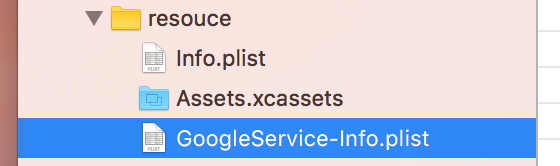
GoogleService-Info.plistをプロジェクトにコピーします。
Podfile
pod initでPodfileを生成します。
pod 'Firebase'
を追加します。
# Uncomment this line to define a global platform for your project
platform :ios, '9.0'

target 'nerutomo' do
  # Comment this line if you're not using Swift and don't want to use dynamic frameworks
  use_frameworks!

  # Pods for nerutomo

  pod 'Firebase'

  target 'nerutomoTests' do
    inherit! :search_paths
    # Pods for testing
  end

end

post_install do |installer|
    installer.pods_project.targets.each do |target|
        target.build_configurations.each do |config|
            config.build_settings['SWIFT_VERSION'] = "3.0"
        end
    end
end
ソースコード
アプリの起動時にFIRApp.configure()を実行することで内部の初期化処理がおこなわれます。
import UIKit
import Firebase

@UIApplicationMain
class AppDelegate: UIResponder, UIApplicationDelegate {

    var window: UIWindow?

    func application(_ application: UIApplication,
        didFinishLaunchingWithOptions launchOptions: [UIApplicationLaunchOptionsKey: Any]?) -> Bool {

        FIRApp.configure()

        return true
    }

    //...
}
以上で導入できます。
関連記事
この他にもiOSアプリ開発で見つけたネタや悩んだ内容など紹介しています。Tipsをまとめておりますのでこちらのページをご参照ください。
